Context
Tarjimly helps refugees, aid workers and people in crisis connect with translators across more than 250 languages.
In these situations, language can affect whether someone gets medical care, legal help, housing support or urgent case assistance.
The app worked, but the path to help was not clear enough for people using it under pressure. Some users had to make too many decisions before getting connected.
The Problem
The main problem was time-to-connection. Users struggled to:
Start translation requests quickly.
Understand the fastest path to help.
Choose between different support options.
Stay confident while waiting.
Continue after a request had started.
I redesigned request entry, translator matching, wait states, translation history and session continuity. I used Lottie for in-product micro-interactions and Jitter to create motion videos and reusable GIF, SVG and JSON assets for product, web and marketing.
Research & Findings
The research showed three main issues.
Users delayed before starting a request.
Some users dropped off before connection.
Under stress, too many choices made the experience harder.
I did not need to remove every option. I needed to make the right one easier to find based on what the user needed.
Design Strategy
1. Clear Entry
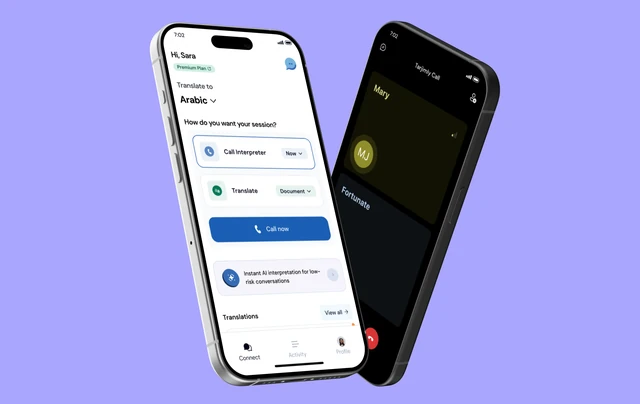
Users see the most important actions immediately: call interpreter for live support, or request translation for text or documents. This reduced hesitation at the starting point.
2. Smart Defaults
The product suggests or detects language where possible and delays non-critical details until later.
3. Visible Progress
Users can see what is happening while the system reaches translators, estimates wait time or confirms a queued request.
4. Smooth Continuation
Users can move from request to live call, chat, translation, transcript or activity history without starting over.
Key Flow
Open app → Choose urgent call or translation request → Select language → System searches for a translator → User sees wait status → Translator connects or scheduling is suggested → Session happens → Transcript or activity is saved.
Motion & Micro-interactions
I used Lottie for micro-interactions such as loading, request confirmation, matching, call and recording states, and completion feedback. I used Jitter to create motion videos and export GIF, SVG and JSON assets for in-app, web and marketing use.
Tools · Jitter + Lottie
Core Mobile Experience
This sequence shows the main mobile flow across language selection, requests, activity and live interpretation.
Continuity Across Requests & Activity
This study shows how the home, Spark entry point, active requests, transcripts and profile fit together.
Outcomes
The redesigned mobile experience helped users connect to support in under 30 seconds across language pairings. It supported over 700,000 people, enabled over 2 million minutes of translation and interpretation and reduced drop-off for urgent requests.


Reflection
Tarjimly Mobile reinforced something simple for me: when people are under pressure, the interface should remove decisions, not add more.
Tarjimly Spark AI
Product Designer · Real-time AI interpretation