Context
Healthcare and legal teams often need an interpreter while they are already supporting a patient or client. They need fast access without adding another complicated process.
Reach by Tarjimly was designed to help organizations connect to professional interpreters quickly across more than 250 languages.
The Problem
Interpreter requests were spread across calls, emails, admin teams, billing tools and separate portals. That made a simple need feel like a long process.
Frontline staff lost time, while administrators had less visibility into usage, quality and team activity.
The product needed to serve both groups:
Frontline staff needed speed.
Administrators needed visibility and control.
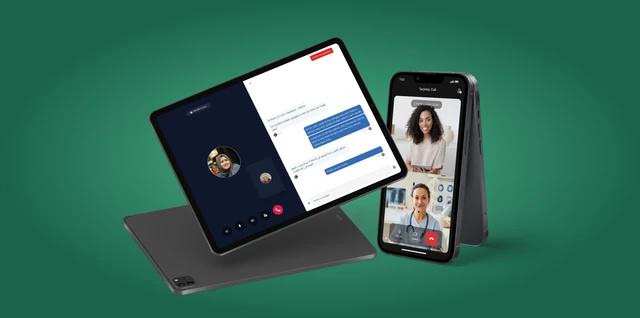
I designed Reach across mobile, tablet and web, covering interpreter requests, live sessions, team workflows, reporting and reusable product patterns. I used Lottie for in-product micro-interactions and Jitter to create motion videos and reusable GIF, SVG and JSON assets for product, web and marketing.
Research & Findings
Frontline workers wanted the fastest path to an interpreter. They did not want to think through admin details during a patient or client interaction.
Administrators needed a different experience. They needed user management, activity tracking, service visibility, reporting and compliance reassurance.
The main design point was:
"The product had to stay simple for staff while still giving organisations the visibility they needed."
Design Strategy
I designed the experience around clear action paths. Users could:
Start an audio interpretation session.
Start a video interpretation session.
Select a language.
Connect with an interpreter.
Continue a session.
Review activity.
Manage requests through the organization workspace.
The urgent path had to stay simple, while the wider system still gave admins the control they needed.
Enterprise Workflow
Organization admin sets up workspace → Team members are invited → Staff start an interpretation request → The system finds an available interpreter → The session begins → Session details are saved → Admins review usage, activity and reports.
Key Design Decisions
Cross-Platform Access
Reach works across mobile, tablet and desktop so teams can use it in hospitals, legal offices, field environments or remote settings.
Team Management
Organizations can manage staff, requests and language activity across departments.
Compliance Confidence
The product surfaces security and compliance signals to help enterprise teams feel confident using it in sensitive environments.
Speed Over Clutter
Every interface decision prioritizes speed, clarity and direct action.
Motion & Micro-interactions
I used Lottie for micro-interactions around loading, connection, session, confirmation and completion states. I used Jitter to create motion videos and export GIF, SVG and JSON assets for product, web and marketing.
Tools · Jitter + Lottie
Frontline Interpretation Flow
The mobile sequence shows language selection, audio and video interpretation, and the main session states.
Enterprise Workspace & Admin Continuity
The web showreel covers sessions, team activity, reporting and management tools.
Outcomes
Reach helped organizations connect with professional interpreters in 30 seconds or less. It also reduced administrative friction and supported language access across mobile, tablet and desktop.
Reflection
Reach reinforced a simple enterprise design lesson for me: frontline staff need speed, while admins need visibility and control. The product has to support both without making either workflow harder.